Windows OS

This week we learned more about the characteristics and features of Windows Operating System such:
Microsoft created the operating system, Windows, in the mid-1980s.
They have a version of the operating system that is designed for the home user, and a professional version, which is intended for businesses.
The versions differ in the depth of networking, security, and multimedia support.
Windows is a proprietary software, which means that Microsoft has placed restrictions on how people can use or copy the software.
Windows comes preloaded on most of the PCs sold today, and can also be purchased separately


Aims of window 7
  •      Decrease start up and shutdown times by 20 seconds
  •      Go to sleep and resume faster
  •      Use up less memory
  •    Pop up search results faster
  •    Reconnect to your wireless network more quickly
  •   Recognize USB devices faster


What is a window 7?
It is latest version of series of operating system to produce for using personal computers and follow up to window vista was released in 2006. An operating system allows managing software and performing essential tasks and also graphical user interface allow to visually interacting computer’s function in a logical, fun and easy way.

Windows 7 also saves time by not booting up various devices during Start Up unless they are currently being used. In other words, if you are not using a Bluetooth device at the moment then Windows 7 will not waste time by running that program in the background. It will wait until you have plugged it in.
However, performance tests of Windows 7 indicate that actual improvements vary and greatly depend on the conditions of your specific computer and the programs you are running. We will go into more detail regarding your computer's ability to run Windows 7 in future lessons.

The anatomy of window 7
The following elements are the main elements of window 7;
  •  Aero view ( an interface that makes your visual interactions with the desktop fun and easy)
  •  Task-bar ( more convenient to use with larger views and easier access
  •   Search ( search bar of the start menu can see a list options group by categories and       allows scan for document ,music , picture and email easily)
  •   Libraries ( to recognize your file in one place)
  •  Gadgets ( select or download  slide show, calendar or weather update to your  desktop )


What is special folder?
Folders are presented to the user through an interface as an abstract concept, and make it possible for an application to ask the operating system. It is used for storing application settings and files, internet files, saving temporary files, using shortcuts to other and so on.


What are the windows special folders?
The main windows special folders are Desktop folder, Start menu folder, Personal documents folder and the special folder name is used to index into the collection to retrieve.  The common special folders are application data, cookies, desktop directory, favorite, fonts and so on.

System tools folder
It is accessed to click start button firstly, all program and then accessories and system tools. It has many applications like disk cleaner (a great window tool which performs disk clean up), disk defragmenter (older versions Microsoft windows) , system restore(allows you to roll back system files and window 7 provide and enhanced and improved version and control panel system (perform maintenance tasks from the windows 7 control panel.
                               z


Network

This week was one of the best, the information and things we learned were important and helped get better and obvious information, I would share here important information about networking.
What is computer networking?
It is a simple group of interconnected computers that can connect two or more computers via hardware or software, and able to communicate with each other. the example of computer network are internet, school network, e-banking etc. computer network has three advantages by using it such as
(1) resource sharing (hardware , software)
(2) information sharing (easy accessibility from anywhere, search capability)
(3) promote communication and collaboration (Email, message broadcast)

What is the network components?
It is major components are


  • communication media
  • interconnecting devices
  • computers
  • networking software
  • applications
Basic networking concepts
There are
  1. topology (the physical layout of the network)
  2. protocol (the rules in data communication)
  3. architecture (hardware and software are integrated to form a working)
Data communication
computer network are communicating between data and computer. it exist at least three element to communicate such as sender, medium and receiver.


Data transmission characteristics
there are bandwidth(rate of transmission), analog or digital(type of signal) and serial or parallel(order of bits).
In Bandwidth that can transmitted measured by bits/sec and the range that medium can transmit data. And then, the signal changes is known as Baud rate.
 Analog and Digital signal transmission
Analog signal transmit along conventional telephone lines, that's also called radio signal.
Digital signal carries discrete between data and computer devices and it represent a pattern of bits.


Serial and Parallel transmission
Serial transmission are transmitted one bit at a time over a medium.
Parallel transmission are transmitted several bits together in one go over a medium.


Types of Network
There are three types of network ; LAN, MAN, and WAN. LAN stand for Local Area Network. It is a network of computer that are in the same physical location, or that spans a small area such as a building or an office. Two types of LAN are Intranet and Extranet. MAN stand for Metropolitan Area Network. It is a network of computer that usually spans a city or a large campus. A MAN usually interconnects a number of LANs. WAN stand for Wide Area Network. It is a network that spans a wide geographical area. The example of WAN are Ethernet and Aparnet.


Types of Topology:

1) In networking terms, the structure you are planning to connect the computers to, is called network topology.

2) Network topology is also referred to as the configuration of a network.

3) It usually refers to the physical arrangement of the computers and other networking devices that are linked together.

4) According to the needs, there are three main types of network topology.

They are bus topology, star topology and ring topology.


Bus Topology


1) In communications technology, you think of a bus as a common “highway” on which data is transmitted.

2) A bus refers to the main physical pathway or central cable where all other devices are connected to it. Like a major motor highway, all traffic flow will be affected if this main “road” is broken.

Ring Topology


1) A ring topology consists of all computers and other devices that are connected in a loop.

2) Ring topology is also known as a ring network. A ring network can be found in Local Area Networks. In a ring network each node directly connect to two neighboring nodes.
3) A server may exist in a ring network, but it will not connect to all the nodes in the network.

Star Topology


1) In the early days of computer networking, all computers were connected to a centralized mainframe computer.

2) All resources and management of information were centered in this main computer.
The idea of a centralized mainframe computer is where the basic concept of a star topology comes from.

3) A star topology consists of a central host which acts as the center, and all nodes connect to the host. A star topology is also known as star network.


The data can be transmitted or transferred from one computer to another and send the data  through the channel use by transmission media which may be either by physical or wireless.


Physical Media
There are

  1. Twisted-pair cable that consists of two independently insulated wires twisted around each other.
  2. Coaxial cable that consist of an insulated center wire grounded by a shield of braided wire.
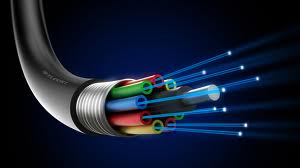
  3. Fiber-optic cable that contains hundreds of clear fiberglass of plastic fibers.
  4. ISDN line, it is a special digital telephone that transmits and receives information at very high speed.
Twisted-pair cable
Fiber optic cable
ISDN line

Coaxial cable


Wireless Media
Microwave system that transmits data via high-frequency radio signals through the atmosphere.
Satellite system that receive transmitted signals, amplify and transmit the signals to the appropriate locations.
Cellular technology that uses antennae resembling telephone towers to pick up radio signals within a specific area.
Infrared technology that transmits data as infrared light waves from one device to another, providing wireless links between PCs and Peripherals.


There are three type of network such as
1.  LAN (local Area Network), this network used for same physical location or a small area such as building of an office. It has two type of LAN. That is
    a.    Intranet
    b.      Extranet
2.    MAN (Metropolitan Area Network), this is used in a city.
3.    WAN (Wide Area Network), it spans a wide geographical area. There are several types of WANS, that is
(a) Metropolitan Area Network(MAN)
(b) Public Access Network(PAN)
(c) Value Added  Network(VAN)
(d) Virtual Private Network(VPN)
Peer-to-peer network
In that network, the entire computers are considered equal and each controls its own information. These networks are not expensive and easy to install. It can use in home networks and in small companies. It has both advantages and disadvantages by using peer-to-peer network.
The advantages are easy to install and configure, no dedicated server, inexpensive to purchase and operate no additional equipment or software and no dedicated administrators.
The advantages are security applies and single resource at a time, users may have many difference passwords, machine sharing resources may suffers reduced performance and does not usually work well with more than 10 users and so on.


Server based network
     it is offer to centralize control and is designed for secure operations. sever responds to client request and may be dedicated, handling only requests from client communities. and then the server require faster CPUs, more memory, lager disk drives and extra peripherals. it also has advantages and disadvantages. simplifies network administration, more powerful equipment, single password for network log on, these are advantages. For disadvantages are server failure renders network unusable, more expensive, server failure causes loss of network resources and so on.


Client/Server Network
Network services are located in a dedicated computer whose only function is respond to the requests of clients. the sever contains the file, print, application, security and other services in a central computer that is available to respond to client requests.

Client Server network

Software

This week we have learned about the other component of the computer which is software. Software is an intangible part of a computer that tells what a computer supposed to carry out and how to do it. It is a collection of computer programs together with the related data. Software is divided into three categories which is system software, application software and programming language. Software layer consisted of application program, operating system, device drivers, and system software. One of the type of system software is operating system(OS). It is the most important software in all computer systems. The OS sometimes called a platform program. Stand-alone OS, Server OS, and Embedded OS is the type of Operating System.


As you know, what is the categories of software?
it divide into three categories such as
(1) system software(controls and maintains the operations of computer and its devices)
(2) application software(makes users more productive and assists them with their tasks)
(3) programming language( programmers to communicate instructions to a computer)

Software layers
it has computer user, application, operating system, device drivers, system software and also computer hardware. it process step by step.


Application program
it is uppermost software layer and it is designed to specific functions, include word processor, database program, web browsers and so on.
Operating system
it is the most important part,it receives the order from application program, manage both software and hardware. it can control and allocation of memory and also responsibilities for the security. it can prevent unauthorized users from accessing such as multiple users, multiple requests for the same resource and access control.
Device drivers 
it is very low level instruction to a device and provide interface or communication direct fro hardware and allows OS to access hardware resources. the drivers are hardware dependent and OS-specific.

System software
it is involved in the Basic Input Output System(BIOS) and provide small library of BIOS function used to operate and control the peripheral devices. It support high level applications and contains common tools that hide the operating system form applications.
it has different types such as

  • Operating system is a program that coordinates all the activities among computer hardware resources and the types of operating system are stand-alone OS(windows, DOS), server OS(windows NT, Net-Ware) and the embedded OS(windows CE, blackberry, Google android).
  • Utility programs is a program that allows a user to perform maintenance-type tasks concern the computer itself, its devices and its programs and most users buy additional program to improve functions like files manage, search, view, disk-clean up, back up, burn etc.

I gained some information about standard software packages. Let’s me share my knowledge.
Do you know what application software is?
It consists of programs designed to make users more productive. And primary function is to apply the power of the computer to do individuals or workgroup, enterprise ability to solve the problems and preform specific tasks. 
Personal application software
It serves for the needs of individual user and includes personal productivity software (enable users to improve their personal effectiveness); software suite (a collection of signal application programs) and integrated application packages (offer a range of capabilities).
Workgroup application software
It support for a teamwork and software that helps groups of people work together more effectively and efficiently.
Enterprise application software
This software that benefits an entire organization and enterprise resource planning (ERP) is a set of integrated programs that manage global organization.
The categories of application software 
  •    Commercial software (sell for profit)
  •    Shareware (distribute for free for trial period)
  •     Freeware ( provide with free of charge)
  •    Public domain software ( donate for public use)

They are also called open source software. It means the software freely available to anyone in a form.


Programming Language.
Programming Language (PL) is a set of word, abbreviations and symbols that enables a programmer to communicate instructions to a computer. There are two type of programming language; Low-Level Language and High-Level Language. 


The first generation of PL is Machine Language, the second generation languages is Assembly Language, the third generation languages is Procedural Languages, the fourth generation languages is Non-Procedural Languages and last but not least is the fifth generation languages which are an issue of debate in the programming community since some programmers cannot agree that they even exist.
ــــــــــــــــــــــــــــــــــــــــــــــــــــــــــــــــــــــــــــــــــــــــــــــــــــــــــــــــــــــــــــــــ

My level of knowledege in ICT


I consider my self as Intermediate level in ICT as a student or among my peers and colleagues. My real interaction with the computer was in 2002, but I start become a geek in 2011 when I got my first laptop. In my early eduction I studied about computer since my first year in school, but it was such theoritical learning only.

In contrast, my experience is 16 years shaping my sufficient skills and interaction with computer literacy. Today I am using a wide range of software start with  Ms office as basic to adobe collection such as Photoshop, Aftereffect, and audition, and video editing software like AVS, Vegas pro, Cyber director and so on, now days I use dreamwaver for web development, and Notepad++ for coding. I am familiar with Linux systems like Backtrack, Ubuntu, Fedora, and Opensusi.

My experience in web development emphasized with coding skills in HTML and to some extent - C language - using any program, as to build up web sites or blogs and to modify templates. I have meticulous skill of blogger platform, but my experieance with CMS systems is beginner and I use Xoops.

I am certified in software maintenance and I do formatting to install any operating system. My use of computer vary from programming, editing videos, and designing to playing games and surf internet.
My favorite web pages are the wordpress platform or interactive and responsive java runtime sites.

I always brows www.w3school.com and www.dev07.com as well as social network and my emails, but the best web site to reduce stress or inspiration is http://neave.com/imagination/.